Build page layout
The Build page is where you create and edit integration processes and components.
The main areas of the Build page are:
-
Component Explorer — Used to create, copy, delete, show usage of, and organize components in folders.
-
Create New button — Used to create new components. Search for or select a new component type to create. To help you make a decision, you can hover on a component type to see a short description about its purpose.
-
Recents section — Use this section to quickly access processes and components recently opened in your account.
-
Component tabs — When you open a component, it appears in a tab. You use a component’s tab to view and edit the component.
A process component’s tab contains the process canvas, which you use to configure the process flow.
When the component tabs area is not wide enough to view all open tabs, a drop-down menu labeled All appears next to the right-most visible tab. All open tabs are available for selection in the menu. The order of the tabs are from most to least recently opened.
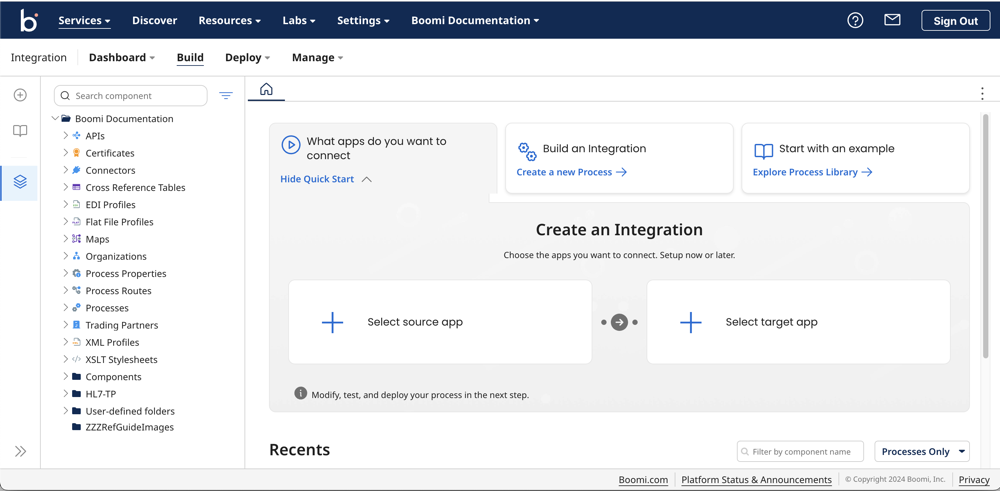
If you have only Build Read Access privileges, the redesigned Integration Start tab provides actions available based on your privileges, such as viewing and clicking items recently opened on the Start tab. In addition, the Create New button and the Build a Process section do not appear.
